 Hermetic
Passwords, documents and signatures. Locked on your own computer.
Hermetic stores everything with state-of-the-art encryption, with no cloud, no account and no browser extension. It signs PDFs with your digital certificate, finds personal data forgotten on your PC and warns you about what is about to expire. You pay once.
- 100% offline
- Digital signature in PDF
- Built for data protection laws
- No subscription
- English, Portuguese, Spanish, French
Where are your passwords and documents right now?
In a notebook, a spreadsheet, a chat app, the Downloads folder, someone else's cloud. Each of these places is an open door.
I use the same password almost everywhere.
When one site leaks, all your accounts fall with it. Hermetic creates a strong, different password for every place, and types it for you.
There are client IDs all over my PC.
Payslips, contracts and ID scans forgotten in Downloads and on the Desktop are a data protection risk. Hermetic finds them and locks them away.
Signing a PDF is always a hassle.
One program to sign, another to check, and the portal rejecting the file. With Hermetic, the signed PDF is one click away.
What makes Hermetic different
It does not try to be one more cloud password manager. It solves, on your own computer, problems the others don't even see.
100% offline, no account
No server, no cloud, no sign-up. There is no "customer database" to be stolen: the vault is an encrypted file on your PC that only opens with your password.
Digital signature inside the PDF
Sign PDFs (PAdES) with your A1 or A3 certificate, with a stamp and your initials. Co-sign PDFs that already carry a signature.
Personal-data sweep
Finds ID numbers, contracts, payslips, medical reports and password lists forgotten on your computer, by data protection category, and locks them in the vault.
Log in without a browser extension
Ctrl+Alt+A fills in the login, and only on the real site: a look-alike fake page gets nothing. No web page can talk to Hermetic.
New passwords born in the vault
On a sign-up form, Ctrl+Alt+G creates a strong password, stores it and types it. No more weak passwords made in a hurry and forgotten.
Expiry dates under control
Driver's licence, passport, contracts, insurance policies and digital certificates. Certificates installed in Windows are tracked automatically, with a warning 30 days ahead.
Invisible in screen captures
The window does not show up in screenshots, recordings or Teams and Zoom screen sharing. To demo it, there is a presentation mode.
Master password out of spyware's reach
You type it in a separate Windows area that common spyware cannot see. A copied password pastes once and disappears.
Pay once
Lifetime licence per computer. No monthly fee, no yearly price increase, no losing access to your data if you don't renew.
Sign PDFs in the format portals and registries ask for
In Brazil, with an ICP-Brasil certificate, the signature is qualified: it has the same legal value as a handwritten one. And everything happens on your computer.
- Inside the PDF (PAdES): a new, signed PDF is created; the original does not change.
- Co-signing: a PDF that already has a signature receives yours without invalidating the previous one. Contracts with several parties, forms that come pre-signed.
- Stamp and initials: draw your initials with the mouse, a pen or your finger, or import an image. They go in the stamp and, if you want, on every page.
- A1 or A3: certificate stored in the vault (with its password), on a token or smart card, or installed in Windows.
- .p7s file for any other file type (Word, spreadsheet, image, zip), separate or with the file inside.
- Safety before signing: with internet, it checks whether the certificate was revoked and blocks the signature if it was.
- Check received signatures: who signed, the certificate chain and whether the file was changed.
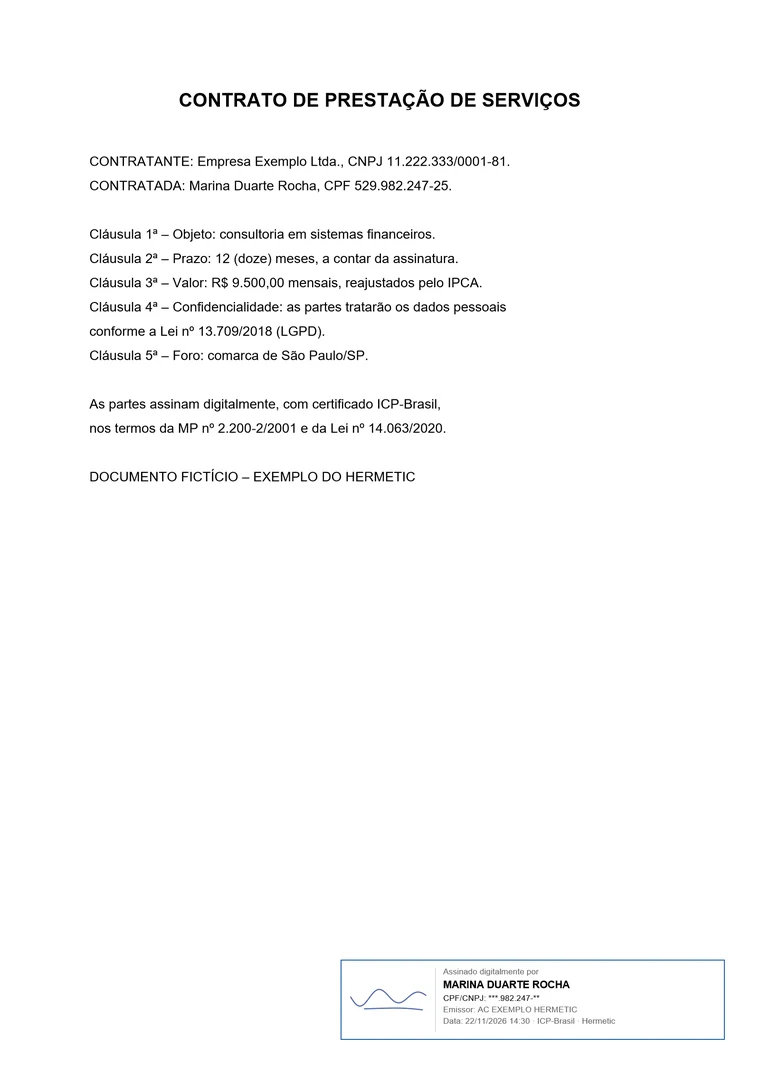
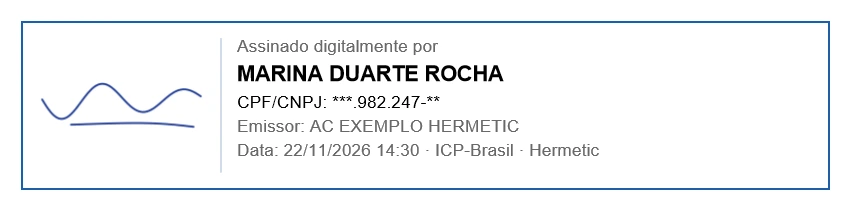
Fictitious document and certificate, for illustration only.
Find the personal data forgotten on your computer
Every password manager saves passwords. Finding and protecting your clients' data, without sending anything to the internet, only Hermetic does.
- Searches Downloads, Documents and the Desktop, by name and by content: PDF, Word, Excel, PowerPoint, LibreOffice, TXT and CSV.
- Data protection categories: sensitive data highlighted (health, diagnosis codes) and Brazilian identifiers with check digits (CPF, CNPJ, PIS, SUS card, voter ID).
- Finds the password spreadsheet every office has, and your own confidential words (client names, case numbers).
- Locks it in the vault and deletes the original only after checking the copy, or moves it to a USB drive.
- Instant warning: downloaded a contract with personal data by e-mail or chat? Hermetic warns you and stores it with one click.
The weak spot of password managers is the browser extension. Hermetic doesn't have one.
Extensions are updated by the store, talk to any open page and are a constant target of attacks. With Hermetic, no web page can ask for a password: it only types when you press the shortcut, and only on the right site.
- Modern, audited encryption (libsodium): Argon2id for the master password and XChaCha20-Poly1305 for every password, note and document.
- Names, folders and titles encrypted too, and document sizes disguised: the disk does not reveal what you keep.
- Tamper-evident: any change to a vault file, down to a single bit, is detected.
- Windows Hello and a USB key file as a second factor, optional and free.
- Package signed by the author and libraries checked at every start: nobody swaps a piece of the program unnoticed.
Auto-lock
Win+L, sleep or a short idle time: the vault locks and the window goes blank.
Paste once
A copied password is delivered a single time and does not stay in the clipboard history.
Protected memory
Passwords live in protected memory, wiped on lock; other programs can't read them.
Verified backups
Automatic daily copies and full backups to a USB drive, all encrypted.
All features
No add-ons, no "premium" tier: every feature in every licence. Items marked ★ are what makes Hermetic unique.
🔑 Passwords
- Fill in logins with a shortcut (Ctrl+Alt+A), no extension, refusing fake sites
- Generate, store and type on sign-up (Ctrl+Alt+G)
- Generator: strong password, passphrase or PIN
- Password health: leaked, reused, weak and old, offline
- 2FA codes (authenticator) inside the vault
- Logins split across screens (Google, Microsoft, banks)
- History of old passwords
- Imports from Chrome, Edge, Firefox, Brave, Opera, Safari, Bitwarden, KeePass, LastPass, 1Password or a spreadsheet
📄 Documents
- Encrypted documents of any size
- Search inside documents (PDF, Word, Excel, PowerPoint, LibreOffice)
- "COPY FOR…" watermark on ID and licence photos
- Open in your usual program and save edits back; the temporary copy is erased
- Store by dragging or from the Explorer right-click menu
- Folders, tags, drag between folders and duplicate warnings
- Send by e-mail and export when needed
✍️ Digital signature
- Sign inside the PDF (PAdES)
- Co-sign PDFs that are already signed
- Initials drawn or imported, in the stamp and on every page
- Revocation check before signing
- Separate .p7s file, or with the file inside
- A1 certificate in the vault (with its password) or A3 on token/smart card
- Check received signatures
🧹 Data protection
- Document sweep by data protection category
- Brazilian identifiers (CPF, CNPJ, PIS, SUS, voter ID) and diagnosis codes in the content
- Finds password lists and confidential words
- Warning on sensitive downloads, without slowing the browser
- Deletes the original only after checking the copy
- Move to a USB drive with a verified copy
📅 Organisation
- Expiry dates with a warning 30 days ahead
- Windows certificates tracked automatically
- Ready-made templates for Brazil, the US, Spain and France: cards, bank accounts, IDs, passports, Wi-Fi and more
- Secure notes
- Several separate vaults (Personal, Company, Family)
- Vault wherever you want: another disk or a USB drive
🛡️ Security
- 100% offline, no account and no cloud
- Window invisible in screenshots, recordings and video calls
- Master password typed in a secure Windows area
- Tamper-evident (down to a single bit)
- Windows Hello and USB key file as a second factor
- Auto-lock and "paste once"
- Automatic backups and verified full backup
📱 Share without the cloud
- Take a password or note to your phone with a QR code, no network
- Share passwords and notes in an encrypted package
- Receive packages straight into your vault
🎨 Your way
- 26 ready-made themes, light and dark
- English, Portuguese, Spanish and French, in one click
- Collapsible side menu for more room
- Keyboard shortcuts and a console for keyboard lovers
- Built-in help and a complete manual
💼 Fair licence
- Pay once, per computer
- 15-day trial with every feature
- Without activation, your data stays accessible (read-only mode)
- Offline activation
- Free computer transfer
Hermetic vs. the alternatives
| Hermetic | Cloud password managers | Spreadsheet or notebook | |
|---|---|---|---|
| Your data off third-party servers | Always | No | Yes |
| Works without internet | Yes | Partly | Yes |
| Strong encryption | Yes | Yes | No |
| Browser extension (a target for attacks) | Not needed | Required | — |
| Encrypted documents of any size | Yes | Limited | No |
| Digital signature in PDF | Yes | No | No |
| Personal-data sweep | Yes | No | No |
| Invisible when sharing your screen | Yes | Rare | No |
| Cost | Pay once | Every month or year | Zero (plus the risk) |
Pay once. Use it for good.
Every feature in every licence. Try it free for 15 days first. Prices in US dollars or euros; in Brazil, see the Portuguese page.
Trial
Get to know it, no strings attached
- Every feature unlocked
- No sign-up, no card
- Afterwards: read-only mode, your data stays accessible
Personal
1 computer
Launch offer: first 20 licences- Every feature, for good
- Updates for version 1.x
- Support by message
- Free computer transfer
Family
Up to 3 computers in the same home
- Everything in Personal
- Up to 3 computers
- One vault per person, or a family vault
| Computers | Lifetime licence, per computer | Yearly plan (optional, from year 2) |
|---|---|---|
| 1 to 4 | US$/€ 79 | US$/€ 15 per computer |
| 5 to 19 | US$/€ 69 | US$/€ 15 per computer |
| 20 to 49 | US$/€ 59 | US$/€ 15 per computer |
| 50 or more | on request | negotiated |
Licence for commercial use and priority support. The yearly plan includes major-version updates and priority support; without it, Hermetic keeps working.
Accounting, law or IT firm? Earn by reselling Hermetic.
Up to 35% on every sale and recurring commission on yearly plans. Your clients get real data protection, and you get a new service to offer.
Frequently asked questions
Do I need internet to use it?
No. Hermetic works 100% offline, activation included. The only exception is optional and under your control: before signing, with internet available, it checks the certificate authority's public revocation list. No file is sent.
Is the digital signature legally valid?
In Brazil, when made with an ICP-Brasil certificate (A1 or A3), it is a qualified signature with the same value as a handwritten one, and can be checked on the government's official validator. In other countries, validity depends on your certificate and local law. The drawn initials are only an image: the certificate is what makes it valid.
Do I need a digital certificate to use Hermetic?
No. A certificate is only needed to sign documents. Passwords, documents, the data sweep, expiry dates and everything else work without it.
What if I forget my master password?
Nobody can recover it, not even us: that is what guarantees only you open the vault. That is why Hermetic suggests an easy-to-remember passphrase and recommends writing it down on paper, somewhere safe. With Windows Hello turned on, you can also open the vault with your PIN, face or fingerprint.
Which computers does it run on?
Windows 10 and 11 (64-bit). No installation: just extract the file and open it.
Can I take my data to another computer?
Yes. The vault is an encrypted folder: copy it to the new computer (or use the USB backup) and open it with your password. Transferring the licence to a new computer is free.
What happens when the trial ends?
Hermetic switches to read-only mode: you keep opening your vaults, viewing, copying and exporting everything. You just can't store new items until you activate.
I already use another password manager. Can I bring my passwords?
Yes. Hermetic imports from Chrome, Edge, Firefox, Brave, Opera, Safari, Bitwarden, KeePass/KeePassXC, LastPass, 1Password or a spreadsheet.
Is there a mobile app?
No: Hermetic is for Windows, on purpose, so it doesn't depend on a cloud or on syncing. When you need a password on your phone, take it there with a QR code, without any network.
Protect what matters, starting today.
Ask for your trial copy: 15 days with every feature, no sign-up and no card.